How Divtechnosoft Built Unyted's Multi-Role EdTech Platform for Students, Parents and Instructors
Unyted needed one platform that could serve as a complete hybrid classroom solution, running live classes, hosting a growing video library, and giving parents real visibility into a child's progress , without turning into three disconnected apps. Here is how we designed and built it.
About Unyted
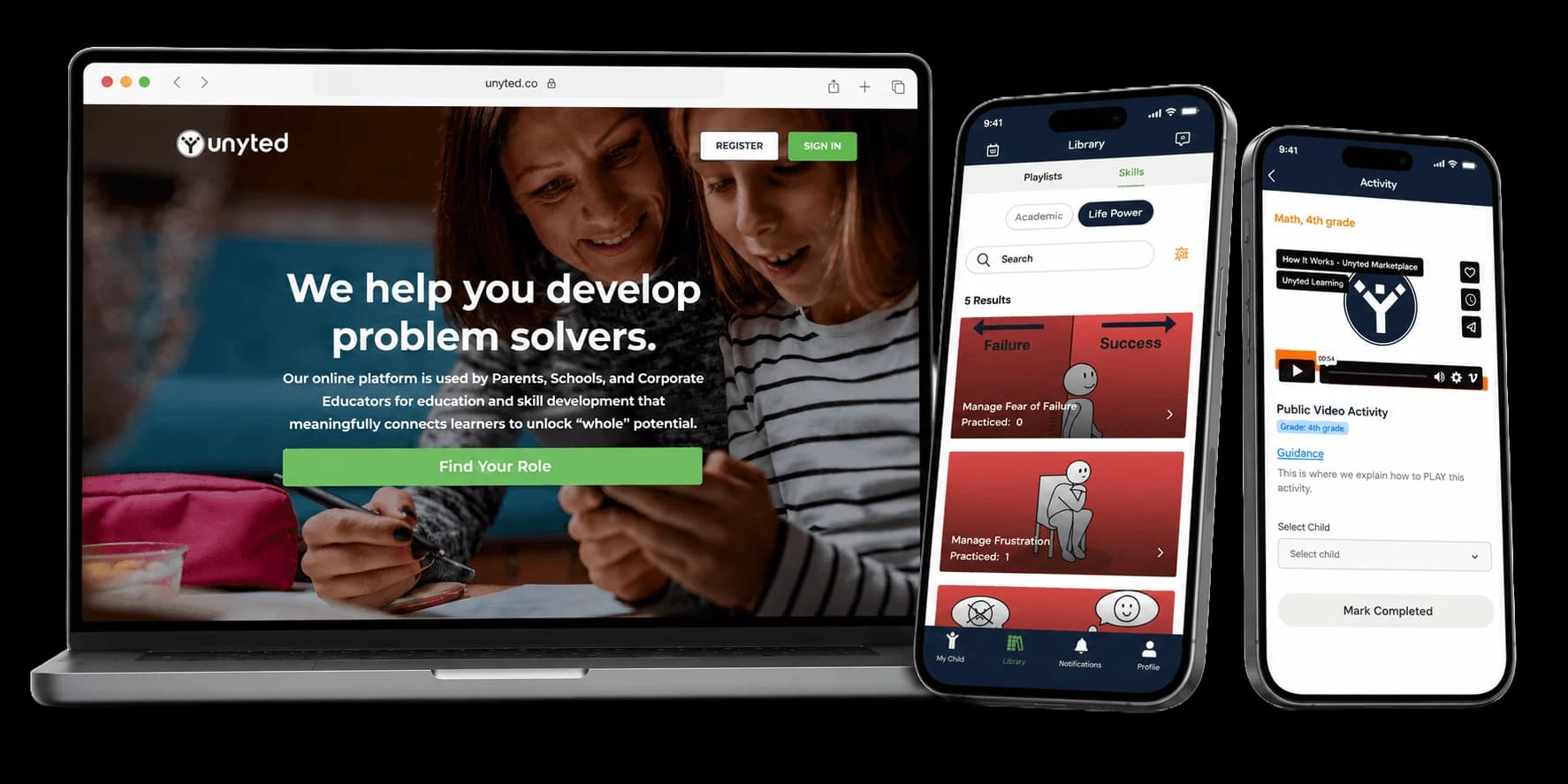
Unyted is an EdTech platform built around three connected roles , student, parent and instructor , instead of a single generic login. The goal from day one was to make the experience feel closer to a real classroom than a video library, promoting experiential education and inquiry-based learning through live sessions, direct messaging, and visible progress rather than a stack of pre-recorded lectures.
Founded in 2021, Unyted works with a marketplace of instructors who run both live and recorded sessions, while parents get a separate dashboard to track how their child is doing , a role most competing platforms treat as an afterthought.

Where Unyted Started
Competitive tutoring is expensive and rigid , fixed batch timings, one-size teaching pace, and almost no visibility for parents into what's actually happening in class. The online alternatives weren't much better: most were built as glorified video libraries with a comments section standing in for real interaction.
Unyted's founders wanted something in between: the structure of a real classroom that fosters 21st-century learning skills, delivered live, with parents kept in the loop the way they would be at an in-person school , and none of the existing apps on the market were built to do all three at once.
The Hard Parts of Building It
Three Roles, One Codebase
Chat That Doesn't Lag Behind
Progress Parents Can Actually Read
From Discovery to Launch
The build ran in four phases over roughly 20 weeks , long enough to get multi-role permissions and live video right, short enough that Unyted could start onboarding instructors before the marketing site was even finished.
Discovery & Planning
We interviewed students, parents and instructors separately before writing a single feature spec , the parent interviews in particular surfaced the demand for a dedicated progress dashboard, which wasn't in the original brief.
Design & Prototyping
Three separate UI flows were prototyped and tested , one per role , because a single dashboard that tried to serve students, parents and instructors at once kept testing poorly with all three groups.
Core Platform Development
The longest phase: mobile apps (built with Expo), the web platform (Next.js), and the backend and database architecture, built in parallel with the real-time chat and live-class layer rather than bolted on afterward.
Marketing Website
Built and shipped in parallel with the final two weeks of platform development so Unyted could start enrolling instructors the same week the app went live, instead of waiting on a separate launch.
What We Built Built
Divtechnosoft designed and built Unyted's platform end-to-end: native mobile apps for iOS and Android, a responsive web platform, and the backend that ties live classes, messaging and progress data together in real time.
Four pieces of that build carry the most weight day-to-day , the instructor marketplace, the live/recorded class system, the chat layer, and the parent-facing analytics.
Instructor Marketplace
Instructors set up a public profile with a bio, subjects taught, and past-session ratings, then list both live and recorded sessions for students to book directly , no manual approval step in the middle.
Live & Recorded Classes
Every live session records automatically and is available for playback within minutes of ending , so a student who misses a class isn't stuck waiting for the instructor to manually upload a recording later.
Real-Time Communication
Students message instructors directly, parents get a separate thread with the same instructor, and file sharing works across both , built so a parent's question and a student's question never get mixed into the same conversation.
Progress Analytics
Parents see attendance, quiz scores and time spent per subject in one view, updated as soon as a class or quiz ends , not on a delay or a weekly digest.
Inside the Platform
Eleven features shipped in the first release. A few of the less obvious ones below made the biggest difference to how the platform actually gets used.
Instructor Marketplace
Search filters by subject, price and instructor rating , students aren't scrolling through every instructor on the platform to find one that fits their schedule and budget.
Multi-Role Access
One login, three different apps depending on who's using it , a student opens their course list, a parent opens their child's dashboard, an instructor opens their class roster, all from the same sign-in screen.
Multiple Child Profiles for Parents
A parent with two or three kids on the platform switches between profiles from one account, instead of juggling separate logins or a single dashboard that mixes both children's progress together.
Support for Project-Based Learning
The platform provides dedicated tools for project-based learning, allowing students to collaborate on assignments that require critical thinking and application, rather than just memorization.
Live Classes & Video Library
Screen sharing and a shared whiteboard are available in every live session by default , an instructor doesn't need to enable them or use a separate tool.
Progress Tracking & Insights
Interactive whiteboards allow instructors to illustrate complex concepts in real-time, making virtual classes as engaging as physical ones.
Doubt Resolution System
A question posted here stays attached to the specific lesson it came from, with threaded replies , it doesn't get buried the way a question in a live chat does once the class moves on.
Quizzes & Assessments
Quizzes and assessments are designed to measure future-ready skills, scoring instantly and feeding straight into the parent-facing progress dashboard , a student sees their result immediately, and a parent sees it update without needing to ask.
Automated Attendance Tracking
Instructors no longer need to waste class time taking roll. The system automatically logs attendance as soon as a student joins the live session, syncing directly to the parent dashboard.
Cross-Platform Mobile Apps
Built with Expo so the same codebase ships to iOS and Android , new features land on both platforms at the same time instead of one platform trailing the other by a release cycle.
Admin Dashboard
One panel for managing users, course content and platform-wide analytics , built for the Unyted team, not for students or instructors, so it's the one part of the platform end users never see.
"Divtechnosoft didn't just build an app; they built the exact virtual classroom experience we envisioned. The multi-role access and low-latency video have completely transformed how our students and instructors interact."
What We'd Do Again , and What We'd Change
Not every decision on this build was right the first time , these four held up, or got fixed, along the way.
Three Personas, Three Different Products
The first prototype tried to serve students, parents and instructors from one shared dashboard with role-based sections , it tested badly with all three groups. Splitting into three separate flows, sharing only the login and the backend, is what finally worked.
Video Quality Is the Product, Not a Feature
Early testing showed students would tolerate almost any UI rough edge except lag or buffering during a live class , a two-second freeze mid-lesson did more damage to trust than any design flaw elsewhere in the app.
Doubt Resolution Drove Retention More Than Course Content
Students who actively used the doubt-resolution feature showed a 35% higher month-over-month retention rate compared to those who only attended live classes.
Mobile Came First for a Reason
Most students opened the platform from a phone between other things , a study break, a bus ride home , which is why mobile got the primary design pass and the web platform followed its patterns, not the other way around.
Built With
Five tools carried most of the weight. Each one was picked for a specific job, not because it's trendy.
Expo
Next.js
Socket.io
Three.js
Tailwind CSS
Common Questions
Questions About This Build
Explore Related Case Studies
Discover how we help other businesses achieve success through digital transformation.





Have a Platform Like This in Mind?
We'll walk through what you're building, where the hard parts are likely to be, and what a realistic timeline looks like , no pitch deck required for the first call.