How Hisab Made Expense Tracking Simple Enough to Actually Use
Divtechnosoft built Hisab end to end in 12 weeks. A React Native expense app with transaction tracking, visual spending insights and PDF reporting, shipped on both Android and iOS.
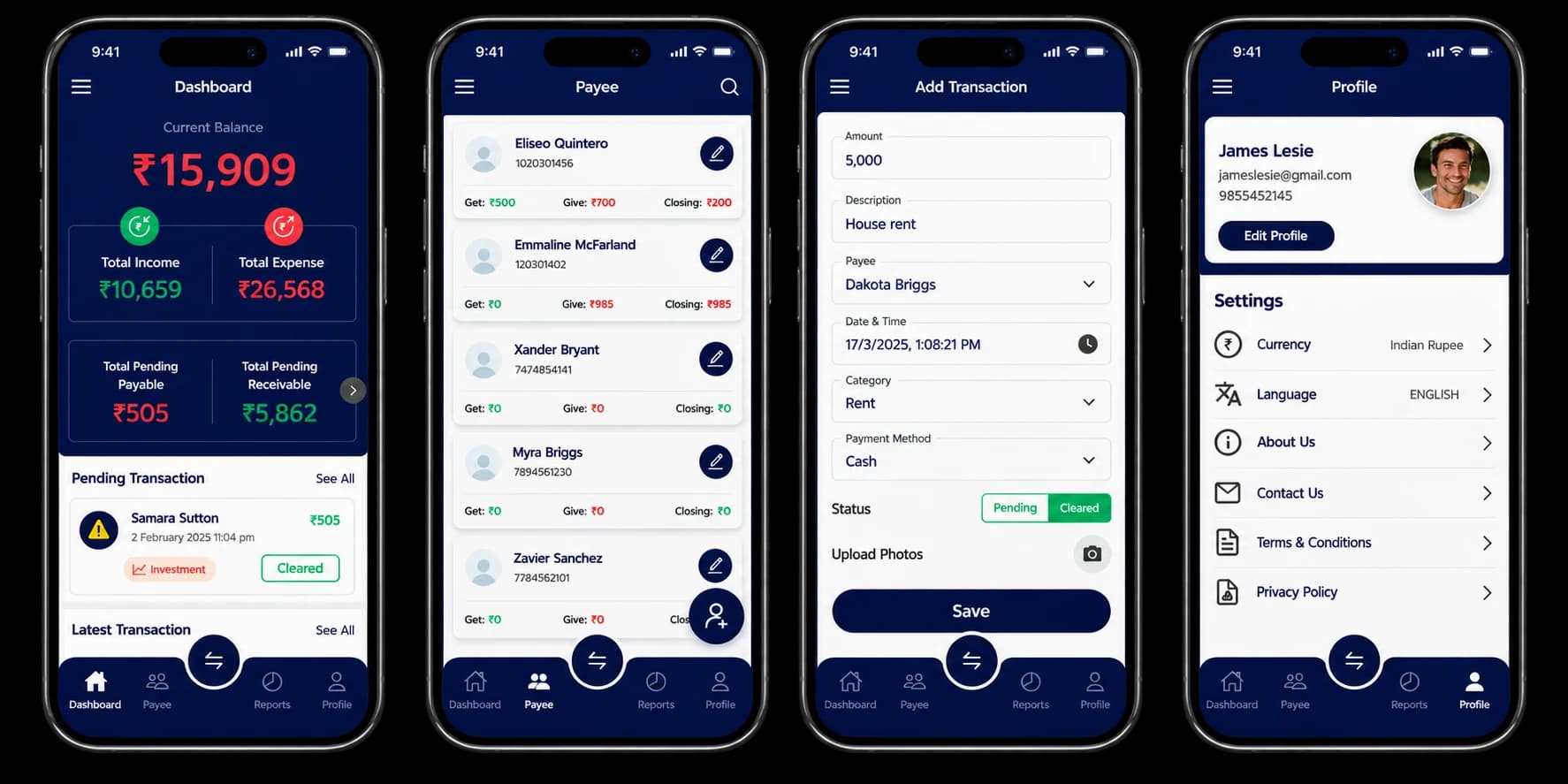
About Hisab
Hisab is a personal finance app for people who want to understand where their money goes without learning an accounting system. It tracks income and expenses by category, turns them into visual insights, and exports the whole picture
The Problem
People struggled to track their daily expenses and understand spending patterns. Existing finance apps were either too complex or lacked essential features like category-based reporting and PDF exports.
What Hisab was up against in a crowded category
Building a simple yet powerful finance tracker with robust data security.
Apps That Ask Too Much Before They Give Anything
The category was split between tools so basic they were pointless and tools so complex people gave up in the first week. Hisab had to be useful on day one without a setup wizard.
A List of Numbers Tells You Nothing
People could already see what they had spent. What they could not see was the pattern, which categories crept up, which months ran over, and where the money actually went.
Asking People to Trust You With Their Money
A finance app is asking for the most sensitive record a person keeps. Anything less than a clear answer about where that data sits and who can reach it loses the user before the first transaction is entered.
Data You Cannot Get Back Out
Users needed to send a clean summary to an accountant, a partner or a landlord. Most apps trap the data inside the app, so the workaround was a screenshot.
Our Development Roadmap
Twelve weeks from the first user interview to both app stores. Each phase is listed below with the time it actually took.
User Research
Interviewed users to understand pain points with existing finance apps.
Backend Development
Built Supabase backend with authentication, data models, and sync logic.
Mobile App Development
Developed React Native app with transaction entry, charts, and PDF generation.
Testing & Launch
Beta testing with users, performance optimization, and app store launch.
Our Solution
Divtechnosoft developed the full mobile application for Hisab, covering both the mobile interface and the backend infrastructure. The project included user authentication, transaction entry and management, reporting features, and data security.
Entry Speed Over Entry Depth
Adding a transaction had to take seconds, because an app that takes a minute per expense gets abandoned by week two. Amount, category and payee are the only required fields. Everything else is optional.
Charts Rendered on the Device der client-side
Insights are computed and drawn locally rather than fetched as images from a server, so the charts open instantly and work whether or not the phone has signal at that moment.
PDF Built on the Phone, Not on a Server
Generating the report on-device means a user's full transaction history never has to be sent anywhere to produce a file they can share. It also means export works offline.
One Codebase, Two Stores
React Native ships the same app to Android and iOS from one codebase, including the charting and the PDF generation, so a fix lands on both platforms at once rather than twice.
What Shipped
Nine features shipped in the first release.
Add Income & Expense Transactions
Quick entry of transactions with amount, category, payee, and notes.
Mark Transactions Status
Track transactions as cleared or pending for better cash flow management.
Filter by Category & Status
Advanced filtering by payee, category, date range, and transaction status.
Visual Graphs & Insights
Interactive charts showing spending trends, category distribution, and patterns.
Category-Based Reporting
Detailed reports breaking down expenses by category with totals and percentages.
PDF Export
Export transaction summaries and reports as formatted PDF documents.
Search & Sort
Quickly find transactions with search and sort by date, amount, or category.
Clean, Mobile-Optimized UI
Intuitive interface designed for quick access and effortless tracking.
What We Learned
Four things the user research changed about the build.
The Features Users Ask For Are Not the Ones They Use
Interviews produced a long wish list. Watching people actually log an expense showed that almost all of it sat unused, so the first release shipped the short list rather than the requested one.
One Chart Beats Five
Early designs offered several ways to slice the same data. Users picked one view and ignored the rest, so the screen was cut back to the breakdown people actually opened.
Privacy Is Answered by Architecture, Not by Copy
No reassurance on a screen moved anyone. What did was being able to say the report is built on the phone and the app never asks for a bank login. The decision does the convincing.
Expense Tracking Happens Standing Up
People log a transaction at the counter, on a platform, in a queue. That ruled out any flow needing two hands or careful typing, and it is why entry was cut to three fields.
Technologies Used
The stack behind the app, and what each part does.
React Native
One codebase shipping to both Android and iOS
Supabase
Authentication, data models, encrypted storage and cross-device sync.
Common Questions
Questions About This Build
Ready to Build a finance manager App Like Hisab?
Tell us what you are trying to build. We will come back with an approach, a phase breakdown, and a realistic timeline, the same way we did for Hisab.